Gameplainer Discord Slash Commands
Once Gameplainer is monitoring your game or socials in a Discord channel, you can pull reviews and analytics on demand by typing / and picking from the command list. Every command runs against the game or social tied to the channel you type it in, so there's nothing to configure, just type the slash command.
Where to type them
Slash commands only work inside a channel that's connected to your game in Gameplainer. If you try one in any other channel, the bot will tell you the channel isn't set up.
If a command does nothing or you don't see it in the autocomplete, the bot might still be propagating the command list (Discord can take up to an hour to push new commands worldwide). Wait a bit and try again.
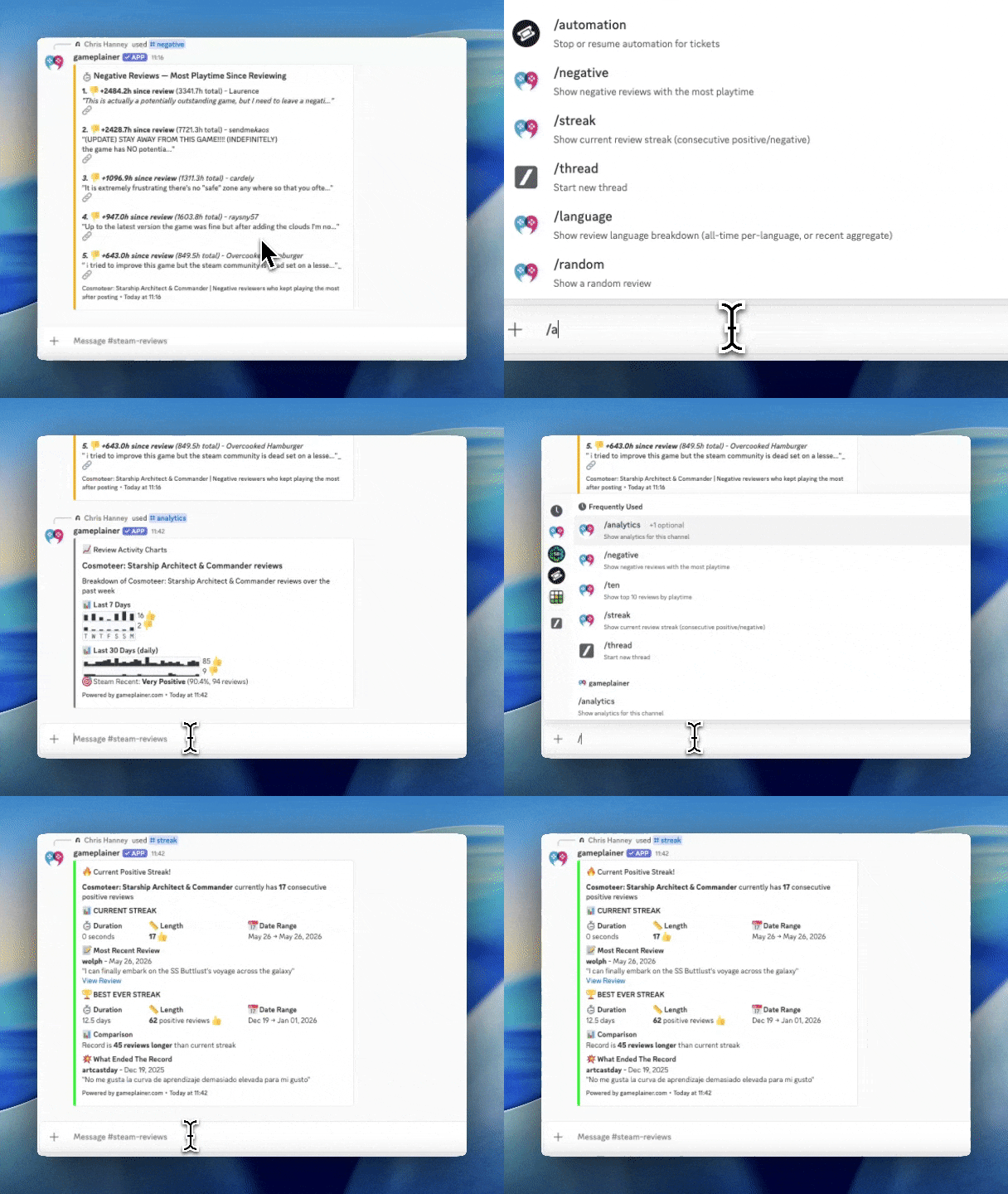
The commands
/stats
This is one of the main ones, sending back an aggregate of all the data found for that channel over a period of time. What you get back depends on the type of channel:
- Game channels (Steam, Xbox, Meta Quest) — review activity sparklines (24-hour, 7-day, and 3-month bar charts of positive vs. negative review counts).
- X (Twitter), Bluesky, YouTube channels — social mention counts and engagement for the period.
- Twitch channels — recent stream and VOD stats.
/stats accepts a period option:
| Value | Meaning |
|---|---|
yesterday |
Last 24 hours |
week |
Last 7 days (default) |
month |
Last 30 days |
month_3 |
Last 3 months |
month_6 |
Last 6 months |
all_time |
Everything on file |
/ten
Top ten reviews by total playtime.
/best
The most helpful review, ranked by Steam upvotes. This is usually the review prospective buyers see first on your store page, so it's worth knowing what it says.
/negative
Negative reviews ranked by playtime. The reviewers who played for hundreds of hours and still left a negative review usually have the most actionable critique. This is often where the next patch's priorities come from.
/negative accepts a period option:
| Value | Meaning |
|---|---|
Total playtime (default) |
Returns negative reviews ordered by most playtime |
Most playtime since negative review |
Returns negative reviews played the most since reviewing |

/flipped
Recent reviews where the player changed their mind — positive that flipped to negative, or vice versa. A flipped review is a strong signal: something specific in your game changed how that player felt.
/streak
Current consecutive-positive (or consecutive-negative) review streak, with the review that started it and, if it's been broken, the review that ended it.
Streaks are a fun morale metric and a useful early-warning when a long
positive run breaks.
/language
Review breakdown by language, with two modes.
/language (default — all time)
Top ten review languages across the entire history of your game, with review counts and percentage share. Tells you which markets actually engage with your game.
/language window:recent
Steam's Recent Reviews badge equivalent — your last 30 days of reviews collapsed into a single sentiment score across all languages.
You'll see:
- Current Steam label (Mostly Positive, Very Positive, etc.)
- Total review count and positive percentage for the window
- A "next grade" hint showing how many more positive reviews you need to move up to the next sentiment tier
The recent window doesn't break down per language because Steam's Recent Reviews score on your store page is a single cross-language number. The upgrade hint helps you understand exactly what it would take to flip the public-facing badge.
Sentiment tiers — how Steam labels work
Both /language window:recent and the in-app review charts use Steam's official thresholds. Below 10 reviews, Steam shows no label at all.
| Total reviews | Tier thresholds (positive percentage) |
|---|---|
| 10–49 | 80%+ Positive · 70%+ Mostly Positive · 40%+ Mixed · 20%+ Mostly Negative · below that, Overwhelmingly Negative |
| 50–499 | 80%+ Very Positive · 70%+ Mostly Positive · 40%+ Mixed · 20%+ Mostly Negative · below that, Overwhelmingly Negative |
| 500 or more | 95%+ Overwhelmingly Positive · 80%+ Very Positive · 70%+ Mostly Positive · 40%+ Mixed · 20%+ Mostly Negative · below that, Overwhelmingly Negative |
The recent (last 30 days) window uses the same thresholds — Steam treats both windows identically.
Stay in the loop
Get notified when we publish new articles on game development and player feedback.
