Gameplainer now tracks historical YouTube & Twitch analytics
We've significantly expanded Gameplainer's capabilities beyond real-time Discord notifications. While you can still get instant alerts for every new video or stream (and we know you love that!), Gameplainer now remembers and analyzes all historical data to give you powerful insights into your game's video and streaming performance.
From Real-Time to Long-Term Insights
Previously, Gameplainer focused on the moment.. alerting you immediately when content went live. But what happened to that data? It disappeared into the Discord void.
Not anymore!
Now every video and stream is tracked, stored, and analyzed to show you trends over time. Want to see if your game's YouTube presence is growing? Curious whether that big streamer event had lasting impact? It's all here.
YouTube Analytics: The Complete Picture
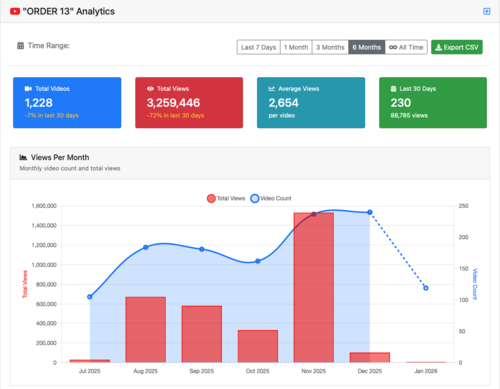
Flexible Time Ranges
Track your game's video performance across multiple time periods:
- Last 7 Days
- 1 Month
- 3 Months
- 6 Months
- All Time
At a glance, you'll see:
- Total Videos - How many videos have been created, with percentage change over the last 30 days
- Total Views - Cumulative view count across all videos
- Average Views per Video - Helping you understand typical reach
- Last 30 Days Performance - Recent video count and view totals
Monthly Trend Visualization
The Views Per Month chart shows both video count (blue line) and total views (red bars) on a single graph. This lets you spot patterns immediately:
- Are creators losing interest even as views increase?
- Did a spike in videos correlate with a spike in views?
- Are you seeing seasonal patterns in content creation?
Creator & Video Rankings
Gameplainer surfaces the videos and creators that matter most:
Top 10 Most Viewed Videos - Which individual videos drove the most eyeballs to your game?
Top 10 Creators by Total Views - Who are your most impactful content partners, measured by cumulative reach?
Top 10 Most Prolific Creators - Which creators are producing the most content about your game?
Recent High Performers - Fresh videos that are punching above their weight in views
Twitch Streaming Analytics: Know Your Streamers
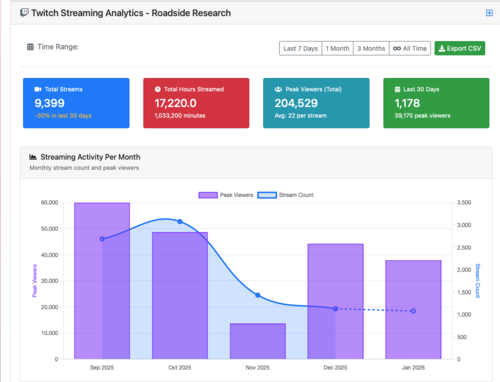
Stream Performance Metrics
Track streaming activity with the same flexible time ranges:
- Total Streams - How many times your game has been streamed
- Total Hours Streamed - Raw airtime your game has received
- Peak Viewers (Total) - Maximum concurrent viewers across all streams, with average per stream
- Last 30 Days Activity - Recent stream count and peak viewer totals
Monthly Streaming Activity
The activity chart displays both peak viewers (purple bars) and stream count (blue line), revealing:
- Whether viewership is concentrated in a few big streams or distributed across many
- Growth or decline in streaming interest
- Impact of updates, launches, or marketing pushes
Streamer Leaderboards
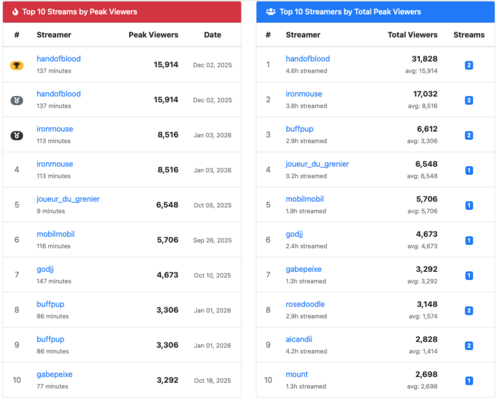
Top 10 Streams by Peak Viewers - Which individual streams had the biggest audience? Includes:
- Streamer name and channel
- Peak concurrent viewers
- Stream duration
- Date of stream
Top 10 Streamers by Total Peak Viewers - Who are your most valuable streaming partners? Shows:
- Total viewership across all their streams
- Number of streams
- Average peak viewers per stream
- Quick link to their channel
The difference between these two views is crucial: one streamer might have one massive stream, while another consistently delivers solid viewership across many streams. Both matter, but in different ways.
Export Everything
Every analytics view includes an Export CSV button, so you can pull the data into your own tools, share with stakeholders, or archive for future comparison.
What This Means for Your Game
These analytics answer questions you couldn't answer before:
- "Our last update was 3 months ago - did video coverage decline?"
- "We sponsored a big streamer last month - did it spark more organic streaming?"
- "Which creators should we prioritize for review codes?"
- "Is our game's content trending up or down?"
You get the real-time Discord notifications you rely on, plus the historical context to make informed decisions about your marketing, updates, and community engagement.
Try It Out
Historical analytics are available now for all Gameplainer users. Log in and check out your YouTube and Twitch analytics pages to see what stories your data tells.
As always, we're tracking everything in real-time while building this historical view, so even if you just signed up today, you'll start building a rich analytics timeline immediately.
Want to see how your game performs across YouTube, Twitch, Steam reviews, Reddit discussions, and more? Start your Gameplainer trial today and get the complete picture of your community.
Stay in the loop
Get notified when we publish new articles on game development and player feedback.
