See what players complain about and how patches landed
The new Sentiment tab on /reviews shows your game's top complaints pulled from reviews, what changed after each patch, and where languages differ. It opens on the last 3 months by default so you see what players say now, even if you haven't patched in a while. This is now open to everyone, not just premium users.

Spot patch impact at a glance
When your newest patch has enough reviews, a badge appears on /reviews and the Sentiment tab. Click a patch to quickly compare it with the reviews that came before it to see what improved and what got worse. Patches released within a week count as one update with its hotfixes, so you see real impact without noise from minor releases.
Click any complaint to see the most helpful reviews driving it, with link to view reviews in either Gameplainer or Steam, so you can read the full context and reply where it matters.
Get sentiment in Discord
The Discord /sentiment command now shows your game's top complaints and what changed after the newest patch, same as the Sentiment page, so you don't have to leave Discord to check.
Search and filter your templates
Find reply templates by name and filter by whether they've been used or who created them. Templates now display in the same format Steam renders them, so you spot formatting issues before you send.
Fixed
- Review Analytics day-of-week chart now draws after switching between tabs
- Dark mode: dropdown arrows on select boxes and open game tab dropdowns are readable again
- Fixed bugs when adding a YouTube or Bluesky account. Now pasting a full URL path actually follows the channel instead of searching for the literal string and finding nothing.
Prioritize feedback on your terms
Set up /reviews and /forums with custom filters so you only see what matters to you right now. Filter by date range (reviews from the past 90 days, forum posts from the past 30 etc), by whether the author reviewed your game, or by any game. Your queue stays sorted the way you want it.

Mark reviews and come back when you're ready
Mark a review on /reviews to reply later, so you can tackle it when you've pushed a fix instead of juggling it in your head. Your mark stays there until you clear it
Find what you're looking for
Search on /reviews and /forums now works the way you'd expect. Boolean search with negative keywords is more reliable, so you can actually find the feedback you need without getting noise.
See your forum audience better
The Steam forum topic breakdown on /forums now shows a graph of when owners, reviewers and your team posted, so you know who's actually in the conversation and when things went down.
Fixed
- Patch notes are easier to scan and look cleaner
- Game dropdown on /reviews stays below the tag bar where it belongs
- When you flick between filters on /reviews the selected tab will be remembered when or if you navigate around the place
Currently
- Playing GTA like the rest of you 😅
Delegate forum replies like you do reviews
Steam forums now work exactly like reviews for team handoff. Assign a topic to a teammate, add a note explaining why, and it moves to the top of their queue while staying out of everyone else's. You can mark topics as high priority too. The queue layout is now the same across reviews and forums, so switching between them feels natural.
Search forums the way you think
Find threads using OR commands (XBOX OR Crossplay OR "Cross-play") and exclude keywords with NOT, so you can surface exactly what you're looking for without drowning in noise.
Faster feedback loops
Refresh your forum data directly from the web instead of waiting an hour for Gameplainer to pick up changes you made on Steam.
Control who sees what
Team members can now be limited to specific games, keeping their view clean and secure. When you invite someone, the team page makes it easy to pick which games they can access with a click-to-edit interface that saves as you go. Add a note when assigning work or dismissing something, so your team knows the reasoning.
Smoother onboarding
Team invitations are simpler to manage, and when Gameplainer gets kicked from a Discord server, you'll get an email and a banner at the top pointing you to Settings > Discord with a quick Reconnect button so you're never left guessing.
Polish all over
Profile pictures throughout the app (assignments, team page, activity feed, navbar) pull from Settings > General or your Discord avatar. The /reviews and /channels pages render better on mobile. Dark mode table highlighting is now readable. Settings > General reorganized into Profile, Sign-in and Preferences cards. Filter your review queue by tags to dodge the trolls.
Monitor your game in the news as it breaks
Google News search is now live, so you can watch for mentions of your game the moment they hit the news. Set it up in seconds with no RSS config needed, and get results flowing straight into Gameplainer.
Define what "needs reply" means to your team
New review rules let you filter out replies you don't care about. Ignore reviews older than a certain age, with too few words, written in a language you don't support, or anything else that matters to your studio. Mark them as handled once and stop seeing them.
You can use custom tags in the reviews page and then with the "Resolve Issue" feature quickly assign a new template for all the matching reviews. Perfect when you finally add cross-play to your game and want to tell all those disappointed reviewers what's new!
See what your game looks like before you set up a monitor
When you create a new social search for Bluesky, YouTube, X, Google News or anywhere else, Gameplainer shows you a live preview of what results will come back. No surprises, no dead channels.

Check your overview without waiting
The game overview page loads much faster now, and Steam app details (like publisher, release date, tags) are visible right on the overview tab instead of hidden behind a button.
Track localization and hardware
Review analytics now breaks down your views by GPU and language, so you can spot which markets and hardware combos need attention.
Easier social channel setup
Add a new social search directly from /socials
Fixed
- Signing in with Discord now works if you weren't already logged in.
- Adding a custom tag to a review no longer leaves a stray text box on your screen.
Spot the reviews that need you
The /reviews page now has four buttons to cut through the noise: Needs reply, Flipped to Negative, Flipped to Positive, and Issue Fixed. Click one to see only the reviews that matter right now, so you're not scrolling through everything to find what you should actually be working on.

Edit generated replies and pick the language
When you generate a reply, you can now edit it before posting. You can also choose to reply in the review's own language or in English, and decide whether to show the translation, hide it, or note that one was used. Gives you full control over what you send back.

More context on your games
The /reviews page now shows contact details, social links, controller support and other store details for each of your games, so you have everything you need without jumping elsewhere.
Discord gets your Steam rating trend
Reviews posted to Discord now include your Steam Recent rating and how it's moved in the last 7 days under every review, so your team sees the full picture without asking.
Steam forums are easier to scan
The /steam_forums page got faster workflows for marking threads as read, so you can quickly see what's new and what forum posts you've already looked at with just a couple of clicks.
Small wins and fixes
- Review Analytics page has quick links to each chart so you skip the scrolling
- Swap between light, dark and gradient modes instantly across the whole app
- Review reply UI is cleaner and faster to use
- Charts export properly on mobile and look right in dark mode
- Meta Quest and Xbox games now sit next to Steam games neatly in dropdowns and on /reviews
- Gameplainer can now read Trading Steam forums that it sometimes missed before
Your games at a glance, the moment you log in
The main page is now a dashboard of what's happening with each of your games, instead of a long text list. You can see where to spend your time before opening anything else.
Know who's streaming your game
- Follow Twitch streamers on the new Watchlist tab and see how much they stream your game, how many people watch, and what else they're playing. Pro follows 5 streamers, Premium follows 50.
- Add a streamer by name even if they've never played your game, or click the eye button next to anyone on /streams .
- Get a Discord ping as soon as one of your watched streamers goes live with your game.
- A weekly watchlist report tells you who streamed your game and how many hours people watched.
- /streams now graphs the last 24 hours of viewers and hours watched, filters by name, viewers, peak viewers and language, shows Twitch profile pictures, and works properly on your phone.
- See how many streamers come back week to week, how long streams run, how big the channels behind your peak viewers are, and a heatmap of when your game gets streamed.
- /streams/analytics breaks down your streamers' audience, starting with which countries they're in.
- Each game's streams page has Live, History and Settings tabs, and follows your team filter.
See what's driving your review score
- A new tag chart shows what players complain about, what they praise, or both side by side, and how often each topic comes up.
- On the "What drives the score" card, click the number to choose how many reviews a tag needs before you trust it.
- The Steam Recent badge chart now goes back to launch (up to two years), marks your Early Access launch separately so you can compare it with 1.0, and zooms into any single week.
- When a game has fewer than 10 reviews in the last 30 days, the chart says so, because that's when Steam stops showing the badge.
- Reviews that flipped now show when they flipped and in which direction, plus how many flipped in the last 30 days and all time.
- /reviews has a trend line for recent reviews and quick links to each game's analytics.
- The Concurrent Players chart has a date filter you can zoom in and out of with a click, and chart sliders are easier to drag.
- You can import Steam patches by hand, so they show up on your charts.
Answer the right forum threads first
- The Steam Forums overview shows at a glance which topics nobody has answered yet, with clearer filters.
- Mark every topic older than 30 days as done in one go.
- A newly added game appears straight away with its import status, plus a "Notify us" button if it gets stuck.
- Steam forum alerts in Discord are tidier: the Steam link is a button and you can see how many Steam reviews the poster has written.
Change your digests from Discord
- The Discord /settings command is now a hub: switch daily and weekly digests on or off, pick the days and send time, or move a digest to another channel, without leaving Discord.
- It works in channels that only receive digests, every section has a Back button, and digests now mention /settings in their footer.
Work as a team
- Review tags belong to your team, so teammates see the tags you add, and you can tag for several teams at once.
- The team filter is clearer on every page, with a shortcut to invite teammates.
- /channels makes it clear which games and searches you can reach through a team.
- If a team channel stops running, you can press "Ping" to ask the owner to fix it. They get an email and a Discord DM explaining the problem.
- When you add a channel on a team, the messaging is simpler, and team leads are reminded about broken channels you can't fix yourself.
Social searches that show results straight away
- Creating a social search (Bluesky, YouTube, Reddit, X, TikTok) now shows your results immediately, with clearer help on connecting it to Discord.
- Zoom the engagement chart to pick dates, see YouTube and Bilibili thumbnails, and open any search's feed straight from Channels.
- Export any results to CSV or Excel, keeping the filters you've set.
- /social shows clearly when a search is switched off or has a problem.
Less clicking, faster pages
- Channel settings save as you change them, and an unsaved-changes bar catches you if you leave before something is saved.
- Filter results by user, description, dates and language across the site.
- The analytics reviews page, /channels and /forums all load faster.
- The navbar, team pages and settings work properly on phones.
- /changelog is searchable, and /status shows how reliable each part of Gameplainer has been over time.
- You'll get an email whenever the privacy policy or terms change.
Fixed
- Edited reviews are translated even when the original wasn't.
- One-word Steam reviews are translated from the language Steam reports, so they're no longer mistranslated.
- English reviews from players outside English-speaking countries show the original text instead of being marked as translated.
- Twitch daily stats show real numbers per language again, instead of 0.
- Stream history, leaderboards and viewer hours are accurate again. Some sessions had been counted twice when two channels tracked the same game.
- Games that change their Steam app ID (Call of Duty: Modern Warfare 3, for example) keep working.
- You can switch the weekly email on and off for individual channels.
- Opening a channel you'd already deleted no longer crashes.
- Team members can change a channel's Discord settings.
- The Twitch /settings command in Discord lists all your roles, not just the first 22.
- Connecting a Discord server while setting up a social search brings you back to your search.
- Steam Forums works again for accounts that downgraded.
- Your browser no longer autocorrects game names when you search on the reviews page.
- Re-enabling a Discord channel that was deleted in Discord shows the right message.
- Plus steadier itch.io forum imports, and no more double spaces in TikTok channel descriptions.
Team Management
- Teams now have permissions. For each team member you can choose whether they can edit your channels, add new games and social searches to your account, use the
/settingscommand in Discord, and manage the team itself. Everyone starts read-only, and you can pick permissions when you invite someone or change them any time on your Team page. Deleting channels and anything that changes your bill stay with you. - Team members with permission can add games and social searches to your account straight from your dashboard or Channels page. They use your plan's credits, and if your plan is full they're stopped and you get an email letting you know.
- Joining a team is easier: if you've been invited, a banner shows up on Gameplainer and you can join with a code we email you, no need to dig out the invite link.

Discord
- The /settings command is now visible to everyone in your server. Account owners and team members you've given permission can use it, even without Discord's Manage Server role. Anyone else gets a private "you don't have permission" reply.
- The
/statscommand now tells you how many negative reviews it would take to drop down a label, so you know exactly how close your rating is to tipping. - Steam forum posts in other languages now have a Translate button in Discord. One click adds the English translation for everyone in the channel, and the result is cached so the second click is instant.
- The /players command now has a refresh button so you can update the stats directly in Discord.
- The /flipped command now shows better dates and charts, and has had the emoji clutter trimmed back so it's actually readable.
Reviews
- A new graph shows the Steam Recent Badge history for your game over the past 6 months, so you can track how your recent review label has trended over time.
- Concurrent Steam players graph is now shown on your Reviews analytics page. You can check this at anytime from Discord using the
/playersDiscord command - All reports can now be exported to CSV or Excel, copied to clipboard, or downloaded as a PNG.
Streams
- Steam broadcasts are now tracked with the same detail as Twitch streams, showing viewer counts over time for every broadcast.
- The streams page now clearly highlights the leading streamer by views.
- Steam broadcasts show days of streaming instead of hours for long ones, and the viewer chart now marks peak viewership and what it was.
- All stream pages can now be exported to CSV and Excel, with streamer URLs included in the files.
- Fixed a lil visual issue where some timestamps were displayed with milliseconds.
Steam Forums
- Forums pages have been simplified to make the data easier to read at a glance.
General
- Review reports update more often for subscribers.
- Reviews longer than 1,500 characters are now translated correctly.
- Shareable Gameplainer review URLs can be copied and sent to your team.
- The review page auto-collapses the UI when you open a direct link to a single review.
🐛 Bug Fixes
Discord
- Fixed the
/flipped,/ten, and/negativecommands not returning reviews shorter than 50 characters. - Fixed flipped review stats not showing on the /reviews page.
- Fixed a bug in the aggregate Discord message for Steam reviews.
Reviews
- Fixed an issue where Gameplainer would mark a review as translated even when it was already in English.
- Fixed small bugs in the calculation of current Steam percentage positive.
General
- Patch imports now correctly distinguish patch notes from news posts.
- Flip alerts are working again. Discord messages for reviews that flip between positive and negative arrive within around 10 minutes, edited reviews in other languages are re-translated automatically, and the flipped reviews summary on the website now reflects the age of your game.
- Messaging for games that have been taken offline (such as demos) has been cleaned up so you no longer see occasional warnings about reviews not being found.
💬 Review Reply Templates
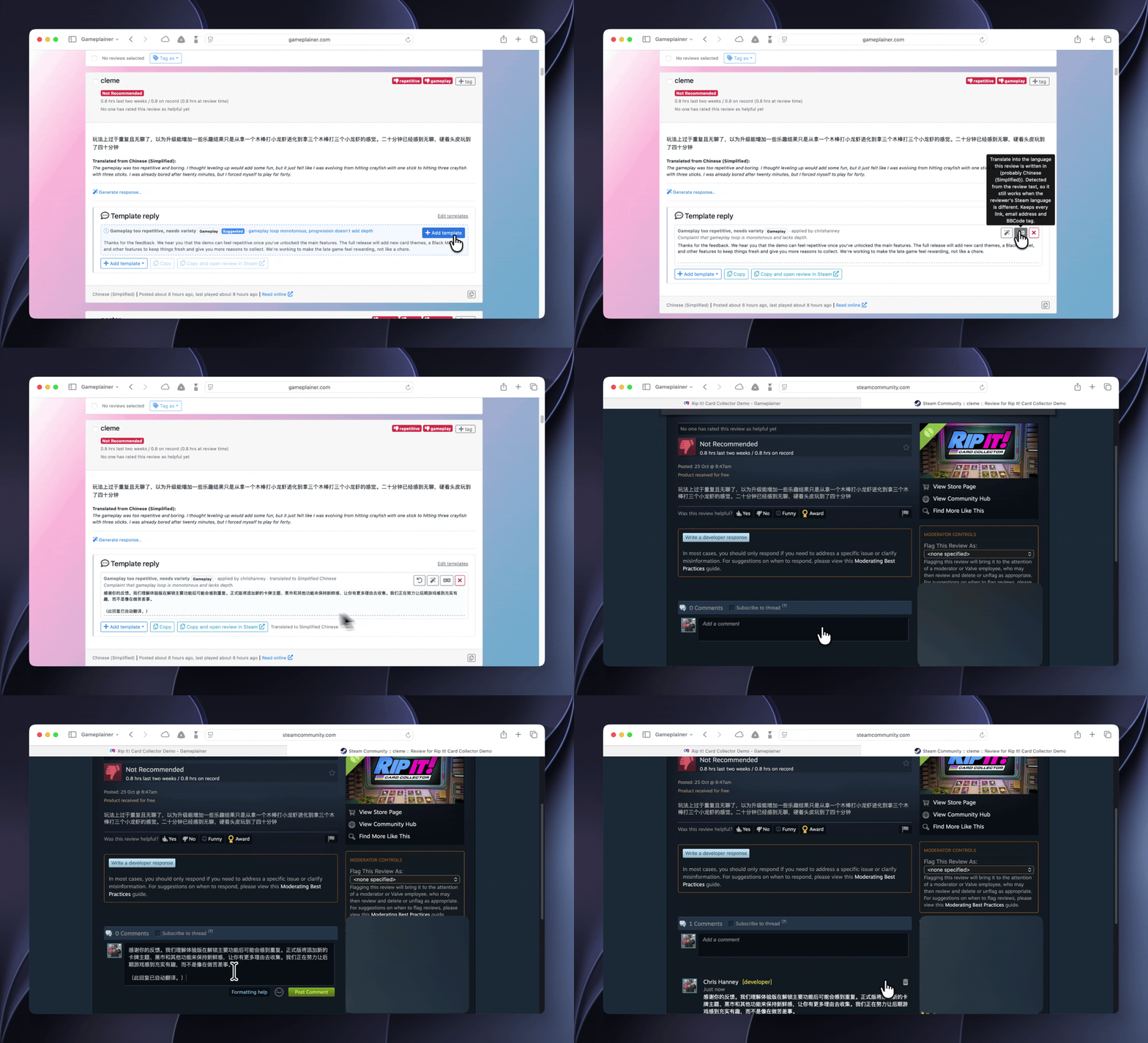
Finally you can stop retyping the same "please send us your log file" reply with Review Reply Templates. Save responses once, share them with your whole team, and even combine several templates into one reply.
- Auto-suggested for negative reviews. Gameplainer matches a template to each negative review so every negative review starts with a proposed template reply.
- "Make a little less serious" button. Loosens a canned reply so it reads a little less... canned. There's also a button that rewrites a response slightly while keeping its tone.
- Search templates by keyword. Type "discord" for your Discord link, or "log" for your log file reminder.
- One click to reply. Copying a response puts it on your clipboard and opens the review on Steam ready for a quick copy/paste reply.
- Edits are tracked. If you tweak a template for one player, it's flagged as modified. If you keep editing the same one, the template probably needs updating
📈 More data
- Steam Curators. See which curators covered each of your games, when, and how they rated it. Gameplainer checks the list for your games every week.
- Bluesky account reports. Track follower counts and engagement on your Bluesky accounts, refreshed daily.
- Twitch hours watched. Gameplainer has been recording viewer counts minute by minute all along. You can now see total hours watched for this week, last month, last 3 months, and more.
- Early Access and 1.0 dates. Games that went through both now show both.
- Playtests are now listed separately from games and demos.
👥 Teams
- If you're on multiple teams, filter the whole site to one team from a single place.
- Review tags created by a team member now belong to the team, so they stay if that person leaves.
- Team members without their own Gameplainer account can now see all of /reviews and /forums.
🐛 Fixes
- Xbox review links point to Partner Center again, not xbox.com.
- Steam forum importer reliability fixes.
- Reddit posts with hashtags no longer turn into giant headings.
- Some dropdown filters were showing up twice. Oops.
Steam channel settings got a major overhaul for readability, plus TikTok results now show thumbnails and view counts, and Steam Forums have a new 'Mark as done' workflow.
Channels & Steam settings
- The
/channelssettings page now has a dedicated tab for results and a separate tab for settings, making it much easier to navigate. - Each Channel page now has a clearer results layout. For Steam, Meta and Xbox channels, there's a summary of review data and direct links to the
/reviewsand/forumspages. - Simplified Steam channel settings significantly. There were a lot of options and they were hard to parse, so they've been cleaned up and reorganised. Really stoked for this one it's been in the planning for ages!
- Steam broadcasts settings got the same treatment. Setting up a Discord
@mentionwhen a broadcast hits a viewer threshold is now clearer to configure. - TikTok results on gameplainer.com/channels now show a video thumbnail and view count.
- Reactivating a disabled channel in /channels now takes effect immediately without needing a page refresh.
- Fixed a pagination bug on the channel results log
- You can now block specific X (Twitter), BlueSky or Google Alerts messages from users or domains you want to mute. (Note: this filter was removed from Steam and Meta as it was never functional there.)
Steam Forums
- Steam Forum topics now have a 'Mark as done' button so you can flag that a thread needs no further attention from your team. If a player posts again, the flag resets automatically and the thread comes back for review.
Reviews
- You can now request refund data for your games, covering reviews that were later refunded.
- The date Gameplainer noticed a user refunded a game after reviewing is now shown on the reviews page.
Discord updates
- You can now tell Gameplainer which Discord category types to ignore in settings/discord. Channels in those categories won't show up when picking where to send messages.
- TikTok and BiliBili Discord channels now support the /stats command for weekly, monthly, three-month and all-time stats.
- The
/settingsDiscord command makes it easier to configure Twitch viewer notification thresholds directly from Discord. - The
/streakDiscord command now includes details on the last best positive streak and a link to the most upvoted review in the current streak. - A weekly
/languageDiscord command to send a language breakdown report for reviews can now be toggled on in your channel config and sent directly to Discord once a week. - Channels that monitor Steam reviews can now get a Discord notification when a game's Steam score category changes (for example Mixed to Mostly Positive).
- Fixed a bug where URLs sent to Discord weren't clickable when the display text was just an emoji (looking at you, 🔗!)
- Fixed an issue where some Steam reviews weren't arriving in some Discord channels.
- YouTube search Discord messages with multiple exclusions now show a count of exclusions instead of listing each one. You can see them all on
gameplainer.com/channels
X/Twitter
- Fixed an issue where following and follower counts weren't being returned.
TikTok
- TikTok searches handle negative terms better and a bug that was surfacing old historical videos has been fixed.
API
- Twitch now works again with the Gameplainer API. You can pull all historical data Gameplainer holds for Twitch streams and VODs. See the Gameplainer documentation for details.
- Twitch game descriptions are now returned by the API.
Reviews
- Reviews can now be filtered to exclude a specific tag, making it easier to bulk-tag reviews by tag (or.. by not having a tag!)
- Steam reviews can now be filtered by 'Funny' votes.
- The
/reviewspage now shows how many reviews are marked as 'Deleted' for your games. - The 'Flipped' badge on the reviews page now shows exactly how many times a user has switched between negative and positive.
- Reviews export to CSV now includes the star filter (Xbox, Meta Quest) and the refunded filter (Steam).
- Username search on the reviews page now has its own dedicated field.
- When a game moves from Early Access to 1.0, Gameplainer now reflects this in game details and the reviews vs patch section.
- Free-to-play games are now marked with a badge on Steam pages.
- Store description is now shown on the reviews page for Meta Quest games.
- Fixed the 'Maybe respond' filter so that unselecting it no longer blocks other active filters.
- Fixed a bug where 'Suggested response' wasn't copying to clipboard when clicking 'Copy to clipboard'.
- Fixed the score-by-patch graph so it shows dates correctly for games that have only been out for a week.
The past few months Gameplainer has been diving deep into Steam Forums, where it's quite clear the volume of review-writers are lurking. Your review writers are in the forums, you should say hello to them!
Here's this weeks updates:
Steam Forums
- Forum analysis now shows how many Steam reviews each poster has made, so you can instantly spot whether someone is an active reviewer or a casual commenter.
- Click into the reviewer breakdown graph to see individual posters grouped by how many reviews they've written.
- Click the "Review" button next to a forum poster's username to pop up their Steam review inline without leaving the page.

Steam Reviews
- You can now filter all your Steam games by aggregated review score ("Overwhelmingly Positive", etc.) on the /reviews page.
- Added a new filter that lets you split reviews by whether the player received the game for free or purchased it.
- Pro and Premium accounts can now download ALL reviews as a CSV, including deleted ones. Purchase type is also included in the export.
- Fixed an issue that was stopping Steam reviews from being delivered to Discord. Cheers to Crema (TemTem) for pointing that out 🙏
- Reddit comment search was broken due to a missed API update, now fixed.
- Subreddit filters in /channels have been cleaned up, making it easier to mute or monitor specific subreddits.
- New Reddit searches now default to searching all of Reddit instead of requiring you to pick specific subreddits first.
Bilibili
- Video fetching is now faster and more reliable.